

Best DisplayPort 2.1 Cables for Flawless 8K and High-Refresh Gaming
2026-10-21
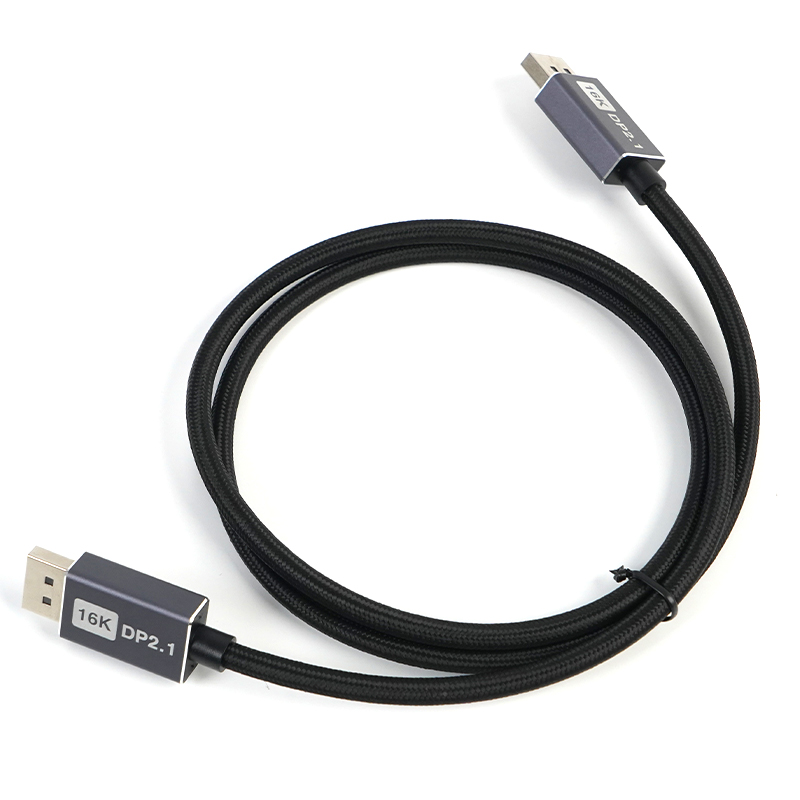
Nothing kills an 8K 120Hz session faster than a DisplayPort cable that can't keep up. DisplayPort 2.1 is finally here with the bandwidth to push uncompressed 8K and high-refresh 4K, but not every cable on the shelf honors that spec. Flaky signal, random dropouts, or capped refresh rates are almost always a cable problem—not your GPU, not your monitor. So before you blame your hardware, take a hard look at the one link in the chain most people ignore. Below are the best DisplayPort 2.1 cables we'd actually trust for flawless 8K and high-refresh gaming. And yes, EBCYX makes the cut more than once.
When DisplayPort 2.1 Actually Matters for Your Setup
If you're running a 4K monitor at 144Hz or higher, you've probably already hit the limits of older DisplayPort versions. DP 2.1 changes that by doubling the maximum bandwidth, so you can finally push 4K at 240Hz without relying on compression. That's the difference between noticing subtle ghosting in fast-paced games and seeing clean, artifact-free motion.
It also shows up in multi-monitor productivity rigs. Pair two 4K displays with high refresh rates and older cables will quickly become the bottleneck. DP 2.1's higher ceiling leaves room for that kind of setup without forcing you to drop color depth or refresh rate. If your work involves color grading or CAD, that headroom isn't a luxury—it's the difference between accurate previews and constant fiddling with settings.
The less obvious case is VR and future displays. Headsets with dual 4K panels or upcoming 8K monitors will demand far more than what DP 1.4 can deliver, even with DSC. If you're buying a GPU or monitor today and plan to keep it for three or four years, DP 2.1 support is worth checking—not for the spec sheet bragging rights, but because it gives you a cable and port that won't need replacing the moment you upgrade your screen.
Cable Certification Labels Worth Paying Attention To
Not every cable certification label carries the same level of assurance, and the gaps between them matter more than most people assume. Marks like UL and ETL come from Nationally Recognized Testing Laboratories and indicate that samples were independently tested for fire and electrical safety. CE marking, by contrast, is often a manufacturer's self-declaration rather than proof of third-party verification. Unless you check which directive applies and whether a notified body was involved, a CE label alone may not tell you much about a cable's real-world performance.
Look beyond the logos for application-specific details. A UL listing with a category code such as UL 444 means the cable was evaluated for communications use, not just generic wiring. Plenum-rated cables carry additional designations like CMP or CL3P that address smoke and flame spread in air-handling spaces. Also worth checking is the certification number against the issuing lab's public database, since counterfeit labels with mismatched fonts or missing traceability codes have become increasingly common in imported cable lots.
8K 120Hz Is Real, but Only with the Right Cable
Many people still assume any HDMI cable will handle the latest video signals, but that assumption falls apart at 8K 120Hz. The data rate involved is enormous, and only a cable built to the Ultra High Speed HDMI specification can sustain it without dropping frames or losing sync.
The real trouble is that not every cable labeled “HDMI 2.1” actually delivers the full 48Gbps bandwidth. Poor shielding, thin conductors, or overly long runs can cause the link to negotiate down to 4K 60Hz, or worse, produce intermittent black screens that are hard to diagnose.
If you want a reliable setup, look for the official Ultra High Speed HDMI Certification label rather than relying on vague marketing. A certified cable has been tested to handle 8K 120Hz with HDR and eARC, and spending a little more on a shorter, properly shielded cable usually solves most handshake issues before they start.
The Hidden Problem with Long Cable Runs
Most installers figure a long cable run is just a longer version of a short one. Same wire, same connectors, same signal—just stretched out. But once you pass a certain distance, the cable stops behaving like a passive pipe and starts acting like a component with its own personality. Capacitance, resistance, and impedance quirks begin to reshape the signal before it ever reaches the far end. What worked flawlessly at ten feet can turn into a flaky, intermittent mess at a hundred.
The real trouble isn't the obvious attenuation you can measure with a simple tester. It's the subtle timing shifts and waveform rounding that accumulate gradually. Digital systems may soldier on until they hit a cliff edge, then fail without warning. Analog setups degrade more gracefully, but that often means users accept slightly soft images or dull audio as normal, never suspecting the cable is quietly stealing detail. Worse, these effects rarely show up during a quick bench test; they emerge only after the cable is buried in a wall or run through a conduit.
Another overlooked factor is environmental coupling. A long span acts like an antenna, picking up noise from nearby power lines, fluorescent ballasts, or even other data cables. That interference can ride along the shield or leak through poor terminations, creating problems that seem random and impossible to reproduce. The fix usually isn't a booster at one end—it's rethinking the run length, the cable type, or the grounding scheme before the drywall goes up.
DSC and HDR Without the Hype
Most discussions of HDR on digital still cameras lean heavily on before-and-after examples that make the feature seem like a magic fix. What actually happens is straightforward: the camera captures two or more frames at different exposure values and blends them, keeping detail in both deep shadows and bright highlights that a single exposure would clip. That is useful, but it is not a replacement for understanding light. If the scene’s contrast range already fits within the sensor’s native latitude, HDR adds little beyond extra processing time.
The difference shows up in high-contrast situations—say, an interior with bright windows or a landscape with a dark foreground and a blown-out sky. In those cases, a well-executed HDR merge can recover texture that would otherwise be lost. But the process also introduces risks: ghosting from moving subjects, halos along high-contrast edges, and a flat, unnatural tonality if the tone mapping is pushed too far. Many photographers find that a single raw file, carefully edited, handles moderate contrast without these side effects.
A more grounded approach is to treat HDR as one tool among several. Check the histogram first; if the graph is bunched at both ends, bracket exposures and merge them later in software. Keep the number of frames to the minimum needed—often three is enough—and use a tripod when subject movement allows. And remember that many recent sensors have enough dynamic range to recover shadows and highlights from a single exposure, making in-camera HDR less necessary than marketing often suggests.
Build Choices That Survive Daily Use
Picking a finish that looks great in the showroom but scratches the first time a set of keys slides across it isn't a choice you'll enjoy living with. Daily abuse comes from small, repeated actions—water rings on a nightstand, a backpack scuffing a lower cabinet, a dog's claws on entry flooring. If a material can't shrug off those routine hits without showing every mark, it will demand more care than you're likely to give it, and the frustration builds faster than the patina.
Think in terms of how things fail rather than how they look on day one. Solid wood edge banding beats thin veneer when a drawer face gets nudged by a hip. Powder-coated metal handles stay cleaner than brushed brass that tarnishes unevenly after months of hand oils. A matte, textured surface hides the fine scratches that glossy finishes magnify. These aren't design compromises—they're the difference between a room that still looks intentional after two years and one that already shows its age.
The real test is whether you'd still choose the same material after seeing it in a busy household, not just in a staged photo. Ask what happens when someone sets down a wet glass without a coaster, or when a chair leg gets dragged instead of lifted. If the answer is a permanent mark that can't be sanded or wiped away, keep looking. The choices that survive are the ones that accept real life as the default setting, not an edge case.
FAQ
Only if your GPU and monitor both support DP 2.1. You will get full 80 Gbps bandwidth, which handles 8K at 60 Hz or 4K at 240 Hz without compression. For most current setups, a certified DP 1.4 cable is fine, but if you are future-proofing or already own new hardware, it is a noticeable step up.
Check for the UHBR certification logo and the exact DP80 or UHBR20 rating. Avoid cables that only say 8K without listing bandwidth. A genuine DP 2.1 cable will mention 80 Gbps and usually have VESA Certified printed somewhere. If the price seems too low for a 2-meter length, it is probably not built for full bandwidth.
Absolutely. Copper cables drop signal quality fast beyond 2 meters at full 80 Gbps. For lengths up to 2 meters, a well-made copper cable works. Between 2 and 5 meters, you need active copper or optical. Over 5 meters, go optical or expect to drop down to lower refresh rates. Always buy the shortest cable that reaches.
They are better for long runs and electrically noisy environments, but they are also more fragile and usually cost more. For a desk setup under 2 meters, high-quality copper with proper shielding is just as reliable. Optical makes sense once you need 3 or more meters or if you are routing through a wall.
No. A cable does not reduce input lag or boost frame rates. What it does is prevent signal errors that cause flickering, black screens, or dropped frames. If your current cable is below spec and causing retransmissions, upgrading can make gameplay feel smoother, but it will not turn 30 fps into 60 fps.
Cable Matters, Club 3D, and Maxonar have solid track records with VESA certification. Silkland and iVANKY also make decent budget options, but always check the specific model's certification rather than trusting the brand name alone. Retailer listings with actual photos of the certification badge are a good sign.
You would need an active DP 2.1 to HDMI 2.1 adapter that supports 48 Gbps. Passive adapters will not carry full 8K 60 Hz or 4K 120 Hz. Even with an active adapter, you might lose VRR or DSC features, so it is better to use a native DP 2.1 port on the monitor if possible.
DP80 (UHBR20) carries 80 Gbps and is what you want for 8K 60 Hz uncompressed or 4K 240 Hz. DP40 (UHBR10) tops out at 40 Gbps, which still handles 8K 30 Hz or 4K 120 Hz with compression. If your monitor only supports DP40, paying extra for a DP80 cable is wasted money.
Conclusion
A dependable DisplayPort 2.1 cable is not something most gamers need until they suddenly do. If your monitor tops out at 4K 120Hz with standard compression, an older certified cable may work perfectly well. The moment you push toward 8K at 120Hz, run a triple-monitor racing sim, or demand raw uncompressed signal from a high-refresh ultrawide, the extra bandwidth of DP 2.1 stops being a spec-sheet flex and becomes the difference between a clean image and a flickering black screen. Look beyond the bold marketing and check for the actual certification label. Cables marked with the full UHBR20 rating can carry up to 80 Gbps, while lower tiers like UHBR10 or UHBR13.5 may choke on the most demanding modes. A cable labeled just “DP 2.1” without the UHBR class is often a recycled DP 1.4 design in new packaging.
The real hidden trap is length. Copper cables degrade quickly past two meters, especially when you are chasing 8K 120Hz or HDR with Display Stream Compression. For runs over three meters, active cables or optical hybrids are the only honest options, though they add cost and can introduce their own handshake quirks. Build quality also separates daily drivers from landfill filler. A thick but pliable jacket, reinforced connector housing, and gold-plated pins that do not wiggle after a week of hot-plugging matter more than any marketing bullet point. And ignore the noise about DSC and HDR being automatic or magical. A capable cable simply lets your GPU and monitor negotiate the highest stable mode without dropping to 4:2:0 chroma or cutting refresh rate in half. Choose a cable that proves itself under sustained load, not one that passes a five-minute test on a showroom floor.
Contact Us
Contact Person: David Yang
Email: [email protected]
Tel/WhatsApp: 8615814734054
Website: https://www.ebcyx.com/